
React에서 드래그 앤 드롭 기능을 구현하기 위한 라이브러리
https://github.com/atlassian/react-beautiful-dnd?tab=readme-ov-file
GitHub - atlassian/react-beautiful-dnd: Beautiful and accessible drag and drop for lists with React
Beautiful and accessible drag and drop for lists with React - atlassian/react-beautiful-dnd
github.com
설치
npm install react-beautiful-dnd @types/react-beautiful-dnd
DragDropContext
드래그 앤 드롭의 컨텍스트를 설정하는 컴포넌트
내부에 Droppable 영역과 Draggable 아이템을 정의
구조
const handleDragEnd = (result: DropResult) => {
	//드래그한 아이템의 위치를 업데이트하는 로직 작성
};

<DragDropContext onDragEnd={handleDragEnd}>
	...
</DragDropContext>
onDragEnd
드래그를 끝낸 시점 호출되는 콜백함수 (필수속성/프롭스)
result 객체
onDragEnd 함수의 매개변수로 드래그 이벤트와 관련된 정보 가짐.
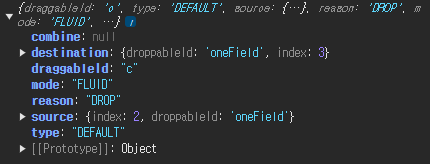
- source: 드래그 원래있던 위치 정보. { index: number, droppableId: string }
- destination : 드롭된 위치 정보. 없을 수도 있음.
- { index: number, droppableId: string } 또는 null (예: 드롭을 잘못된 위치에 한 경우)
→ 드롭이 유효한지 확인 필요!
ex. if (!destination) return;- draggableId : 드래그된 요소의 고유 ID.
- type : 드래그 작업의 타입(같은 타입끼리만 드래그 가능)
더보기
const [items, setItems] = React.useState(["a", "b", "c", "d", "e", "f"]);

const onDragEnd = (result: DropResult) => {
    const { source, destination } = result;

    if(!destination || source.index === destination.index ) return;

    setItems((oldToDos) => {
        const copyItems = [...oldToDos]; //const copyItems = Array.from(items);
        const [removed] = copyItems.splice(source.index, 1);
        copyItems.splice(destination.index, 0, removed);
        return copyItems;
    });

};
Droppable
드래그한 항목을 놓을 수 있는 영역
이 영역 내에서 Draggable 아이템을 이동 가능
<DragDropContext onDragEnd={handleDragEnd}>
    <Droppable droppableId="oneField"> //droppableId : 드롭영역 고유이름(필수)
        {(provided) => ( //children은 함수여야함
        	<ul ref={provided.innerRef} {...provided.droppableProps}>
            	//드래그 요소들
            	{provided.placeholder}
            </ul>
        )}
    </Droppable>
</DragDropContext>
provided 객체
드롭 가능한 영역 정의하는 데 사용
- provided.innerRef: 드롭 가능한 영역을 DOM에 연결하기 위한 ref.
- provided.droppableProps: 드롭 가능한 영역에 필요한 속성.
- provided.placeholder: 드래그 중인 아이템이 리스트에서 차지할 공간.
Draggable
드래그할 수 있는 아이템
<DragDropContext onDragEnd={handleDragEnd}>
    <Droppable droppableId="oneField">
        {(provided) => (
            <ul ref={provided.innerRef} {...provided.droppableProps}>

                {items.map((item, index) => (
					//움직일요소들의 고유값 draggableId, index prop 을 필수로 가짐
                    <Draggable key={item} draggableId={item} index={index}>
                        {(provided) => (
                            <li
                                ref={provided.innerRef}
                                {...provided.draggableProps}
                                {...provided.dragHandleProps}
                            >
                            	{item}
                            </li>
                        )}
                    </Draggable>
                ))}

                {provided.placeholder}
            </ul>
        )}
    </Droppable>
</DragDropContext>
provided 객체
드래그 가능한 아이템 정의하는 데 사용
- provided.innerRef: 드래그 가능한 아이템을 DOM에 연결하기 위한 ref.
- provided.draggableProps: 드래그 가능한 아이템에 필요한 속성.
- provided.dragHandleProps: 드래그 핸들(드래그를 시작할 수 있는 영역)에 필요한 속성
(결과)
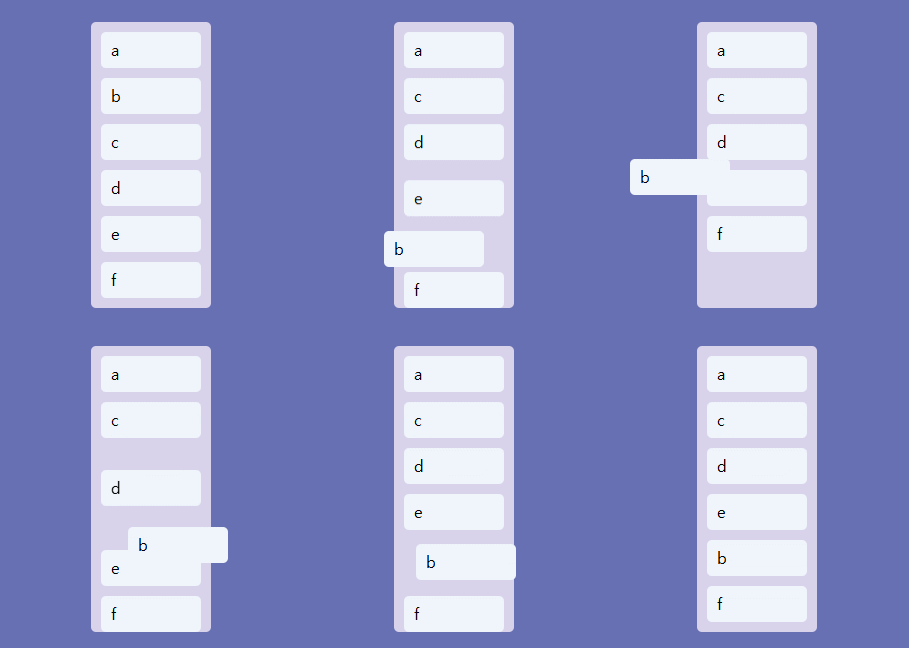
*React.memo 사용
a를 c밑으로 이동시 abcdef , bcadef 다시 리렌더링됨
export default React.memo(DraggableCard);이동된 b,c,a만 리렌더링됨
Snapshot
-DroppableStateSnapshot
| 속성 | 타입 | 설명 |
| isDraggingOver | boolean | 현재 Draggable이 해당 Droppable 위에 있는지 여부 (board위에 있을때) |
| draggingOverWith | string | null | 현재 Draggable의 ID |
| draggingFromThisWith | string | null | 현재 이 Droppable에서 드래그 중인 Draggable의 ID (board 떠날때) |
| isUsingPlaceholder | boolean | Droppable이 현재 placeholder를 사용 중인지 여부 |
-DraggableStateSnapshot
| isDragging | boolean | 현재 항목이 드래그 중인지 여부 |
더보기
const Area = styled.div<IAreaProps>`
    background-color: ${props =>
    props.isDraggingOver // board 위에 있을때
      ? "#B8A9D9"
      : props.isDraggingFromThis // board 떠날때
      ? "#E8E4F3"
      : "transparent"};
    transition: background-color 0.3s ease-in-out;
`;

<Droppable droppableId={boardId}>
    {(provided, snapshot) => (
        <Area ref={provided.innerRef} {...provided.droppableProps}
            isDraggingOver={snapshot.isDraggingOver}
            isDraggingFromThis={!!snapshot.draggingFromThisWith}
        >
            ...
            {provided.placeholder}
        </Area>
    )}
</Droppable>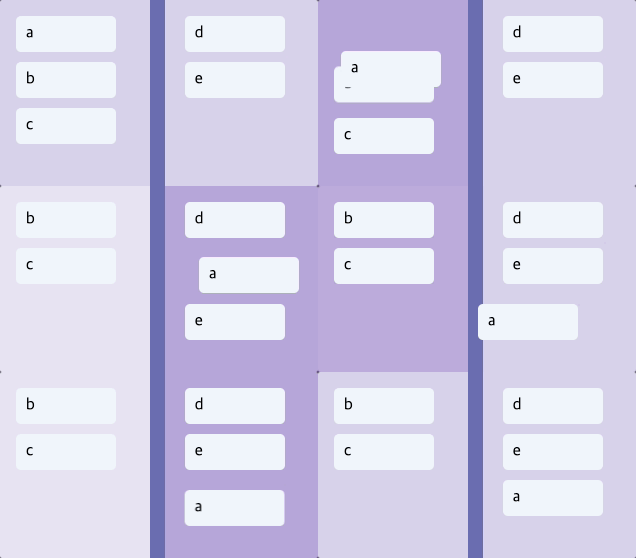
'React' 카테고리의 다른 글
| [React] Framer Motion(2) (0) | 2025.07.06 |
|---|---|
| [React] Framer Motion(1) (0) | 2025.07.02 |
| [React] React Hook Form (0) | 2024.12.27 |
| [React] Recoil (0) | 2024.12.20 |
| [React] ApexCharts.js (0) | 2024.12.15 |