웹 애플리케이션에서 동적 차트를 생성할 수 있는 라이브러리

유형 참고 : https://apexcharts.com/react-chart-demos/
설치
React와 함께 사용
npm install --save react-apexcharts apexcharts
import
import ReactApexChart from "react-apexcharts";
import { ApexOptions } from "apexcharts"; // 타입 가져오기
props
‣ type
: 차트유형 (String) ( 기본값 line )
line, area, bar, pie, donut, radialBar, scatter, bubble, heatmap, candlestick, boxPlot, radar, polarArea, rangeBar, rangeArea, treemap
‣ series
: 차트에 표시할 데이터 배열 정의(Array) (기본값 undefined)
차트유형마다 다름 (문서 참고)
series: [
  {
    name: "Price", // 데이터 이름
    data: [10, 20, 30, 40, 50], // y값 배열 (x축 값은 options에서 설정)
  },
];
‣ width, height
차트의 너비 (String || Number) ( 기본값 ‘100%’ )
차트의 높이 (String || Number) ( 기본값 auto )
‣ options
: 차트 설정 및 스타일 지정 객체 (Object) ( 기본값 {} )
// 주요속성만,, 문서참고
-chart : 차트 기복 속성,스타일 정의
-xaxis : x축의 속성
-yaxis : y축의 속성
-stroke : 선의 스타일을 정의
-colors : 데이터 색상
-tooltip : 데이터 포인트 툴팁 스타일 정의
-fill : 차트 채우기 스타일을 정의
사용
import React from "react";
import ReactApexChart from "react-apexcharts";
import { ApexOptions } from "apexcharts";

const LineChart = () => {
  const series = [
    {
      name: "Price",
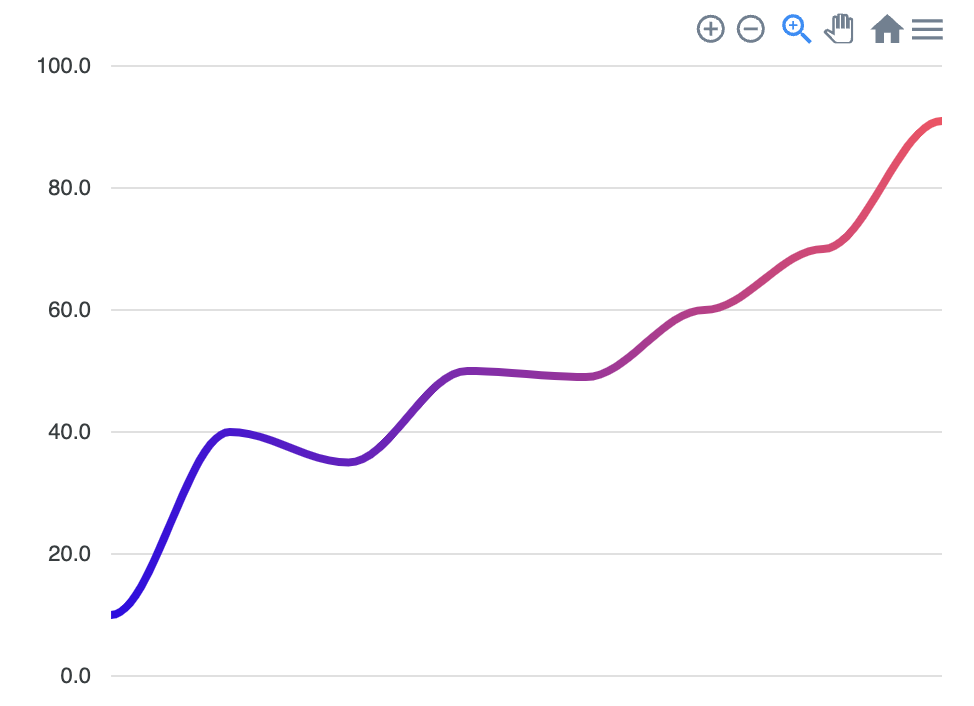
      data: [10, 40, 35, 50, 49, 60, 70, 91],
    },
  ];

  const options: ApexOptions = {
    chart: {
      type: "line",
      height: 350,
      toolbar: { show: true },
    },
    xaxis: {
      categories: ["2024-01-01", "2024-01-02", "2024-01-03", "2024-01-04"],
    },
    ///차트 디자인
    stroke: {
      curve: "smooth",
      width: 2,
    },
    colors: ["#FF4560"],
    fill: {
        type: "gradient",
        gradient: {
            gradientToColors: ["#300be8"],
            stops: [0, 100],
        },
    },
    grid: { show: true },
    tooltip: {
      y: {
        formatter: (val) => `$${val}`,
      },
    },
  };

  return (
    <ReactApexChart type="line" series={series} options={options} height={350} />
  );
};

export default LineChart;
(결과)
문서가 잘되어있어 참고 : https://apexcharts.com/docs/installation/
Installation & Getting Started – ApexCharts.js
Integrating ApexCharts is as simple as it can get with extensive API docs and 100+ samples ready to be used. Check out all the options of ApexCharts
apexcharts.com
+)타입
const [state, setState] = React.useState<{
        series: ApexAxisChartSeries;
        options: ApexOptions;
    }>({
series: [{
            name: 'XYZ MOTORS',
            data: dates
}], ~~'React' 카테고리의 다른 글
| [React] React Hook Form (0) | 2024.12.27 |
|---|---|
| [React] Recoil (0) | 2024.12.20 |
| [React] React Helmet / Icon (0) | 2024.12.13 |
| [React] TanStack Query(React Query) (0) | 2024.12.10 |
| [React] React with Typescript (0) | 2024.12.05 |