Styled Components
: JS파일 내 CSS를 사용할 수 있게 해주는 CSS-in-JS 라이브러리
설치
npm i styled-components @types/styled-components
기본 사용
const 컴포넌트명 = styled.태그명`~css~`;import styled from "styled-components";
const Button = styled.button`
background-color: thistle;
border: none;
color: white;
`;- Class Name 자동랜덤으로 주어짐
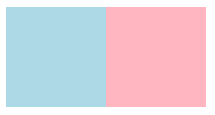
프로퍼티 사용 동적스타일링
const Container = styled.div`
  display: flex;
`;
const Content = styled.div`
  background-color: ${props => props.bgColor};
  width: 100px;
  height: 100px;
`;

function App() {
  return (
    <Container>
      <Content bgColor={"lightblue"}></Content>
      <Content bgColor={"lightpink"}></Content>
    </Container>
  );
}
*${}
백틱(```)으로 감싸인 문자열안에서의 변수 또는 CSS-in-JS안의 동적 스타일 적용때 사용
확장 styled()
기본컴포넌트에 스타일을 덧붙여 확장해 새컴포넌트로 만듦
const Btn = styled.button`
  background-color: thistle;
  color: white;
`;

const RoundedBtn = styled(Btn)`
  border-radius: 50px;
`;

function App() {
  return (
    <>
      <Btn>123</Btn>
      <RoundedBtn>123</RoundedBtn>
    </>
  );
}
as
스타일은 유지하면서 태그나 컴포넌트를 교체
const Btn = styled.button`
  background-color: thistle;
  color: white;
`;
const StyledH1 = styled.h1`
  background-color: blue;
`;

function App() {
  return (
    <div>
      <Btn>버튼</Btn> //기본버튼
      <Btn as="a" href="https://example.com">Go to example</Btn> //링크처럼 렌더링
      <StyledH1 as={RoundedBtn}>Go to example</StyledH1> //StyledH1로 렌더링
    </div>
  );
};
조건부 적용 예시
더보기
const StyledElement = styled.div`
  color: ${props => (props.error ? "red" : "green")};
  font-size: 20px;
`;

function App() {
  const isError = true;

  return (
    <StyledElement as={isError ? "p" : "span"} error={isError}>
      {isError ? "Error occurred" : "All good"}
    </StyledElement>
  );
}
attrs({})
HTML 태그의 속성 설정 가능
- 특정 속성을 항상 포함, 속성값을 동적으로 설정 해야하는 경우 유용
import styled from "styled-components";

const StyledButton = styled.button.attrs({
  type: "button", // 기본으로 "type" 속성을 추가
  disabled: true  // 기본으로 버튼 비활성화
})`
  background-color: blue;
  color: white;
  padding: 10px;
`;

function App() {
  return <StyledButton>Click Me</StyledButton>;
}
아래와 같음
<button type="button" disabled>Click Me</button>
*VSCode 자동완성 플러그인
vscode-styled-components
https://marketplace.visualstudio.com/items?itemName=styled-components.vscode-styled-components
vscode-styled-components - Visual Studio Marketplace
Extension for Visual Studio Code - Syntax highlighting for styled-components
marketplace.visualstudio.com
'React' 카테고리의 다른 글
| [React] useRef (0) | 2024.12.02 |
|---|---|
| [React] Styled-Components에서 애니메이션, 테마 (0) | 2024.11.28 |
| [React] Navigation (0) | 2024.09.19 |
| [React] Router (0) | 2024.09.18 |
| [React] useContext (0) | 2024.09.16 |