프로젝트 생성

Welcome 페이지 만들기
Jar사용시 /resources/static/ 위치에 index.html
(War - src/main/webapp/위치에 index.html)
로깅
System.out.println()로 콘솔을 사용해 정보 출력하지 않고, 별도의 로깅 라이브러리를 사용해 로그 출력함.
로깅 라이브러리
스프링 부트 라이브러리를 사용하면 스프링 부트 로깅 라이브러리( spring-boot-starter-logging)가 함께 포함됨
- SLF4J - http://www.slf4j.org (인터페이스)
- Logback - http://logback.qos.ch (그 구현체)
스프링 부트가 기본으로 제공하는 Logback을 대부분 사용
로그 선언
private Logger log = LoggerFactory.getLogger(getClass());
private static final Logger log = LoggerFactory.getLogger(Xxx.class)
@Slf4j //롬복 사용 ✅
로그 호출
@Slf4j
@RestController //@Controller + @ResponseBody
public class LogTestController {

    @RequestMapping("/log-test")
    public String logTest() {
        String name = "Spring";

        log.trace("trace log={}", name);
        log.debug("debug log={}", name);
        log.info("info log={}", name);
        log.warn("warn log={}, {}", name, name); //이런식 취합도 됨
        log.error("error log={}", name);

        return "ok";
    }
}
@Controller - 반환 값 String일 시 뷰 이름으로 인식 뷰를 찾고 뷰 랜더링됨 → 뷰 반환(jsp, html)
@RestController - HTTP 메시지 body에 바로 입력. 그래서 실행 결과로 ok 메세지를 받을 수 있음 → 응답 body에 직접 반환(문자열, JSON)
-application.properties
#전체 로그 레벨 설정(기본 info)
logging.level.root=info
#hello.springmvc 패키지와 그 하위 로그 레벨 설정
logging.level.hello.springmvc=debug
LEVEL: TRACE > DEBUG > INFO > WARN > ERROR
개발 서버는 debug 출력
운영 서버는 info 출력
출력 포맷
시간, 로그 레벨, 프로세스 ID, 쓰레드 명, 클래스명, 로그 메시지
2025-04-17T12:15:54.679+09:00 INFO 11779 --- [springmvc] [nio-8080-exec-1] h.springmvc.basic.LogTestController : info log=Spring로그 사용
log.debug("data="+data)❌ //문자 더하기 연산!이 발생
log.debug("data={}", data)⭕️
장점
- 로그 레벨에 따라 개발 서버, 운영서버에서는 출력하지 않는 등 로그를 상황에 맞게 조절할 수 있다.
- 시스템 아웃 콘솔에만 출력하는 것이 아니라, 파일이나 네트워크 등, 로그를 별도의 위치에 남길 수 있다. 특히 파일로 남길 때는 일별, 특정 용량에 따라 로그를 분할하는 것도 가능하다.
요청 매핑
기본요청
@Slf4j
@RestController
public class MappingController {

    //HTTP 메서드 지정x -> 모두 허용 GET, HEAD, POST, PUT, PATCH, DELETE
    @RequestMapping("/hello-basic") //다중 설정도 가능({"/hello-basic", "/hello-go"}`)
    public String helloBasic() {
        log.info("helloBasic");
        return "ok";
    }
HTTP 메서드 매핑 축약
@GetMapping, @PostMapping, @PutMapping, @DeleteMapping, @PatchMapping
//method 지정
@GetMapping("/mapping-get-v2")
    public String mappingGetV2() {
    log.info("mapping-get-v2");
    return "ok";
}
PathVariable(경로 변수) 사용
최근 HTTP API는 "/users/1"같은 리소스 경로에 식별자를 넣는 스타일을 선호
//변수명 같으면 생략 가능
//@PathVariable("userId") String userId -> @PathVariable String userId
@GetMapping("/mapping/{userId}")
public String mappingPath(@PathVariable("userId") String data) {
    log.info("mappingPath userId={}", data);
    return "ok";
}
다중사용
@GetMapping("/mapping/users/{userId}/orders/{orderId}")
public String mappingPath(@PathVariable String userId, @PathVariable String orderId){
    log.info("mappingPath userId={} orderId={}", userId, orderId);
    return "ok";
}
http://localhost:8080/mapping/users/userA/orders/100실행
특정 파라미터 조건 매핑
파라미터에 mode=debug있어야 호출됨(잘 사용하지는 않음)
@GetMapping(value = "/mapping-param", params = "mode=debug")
public String mappingParam() {
    log.info("mappingParam");
    return "ok";
}
조건들 가능
params="mode",
params="!mode"
params="mode=debug"
params="mode!=debug" (! = )
params = {"mode=debug","data=good"}
실행 http://localhost:8080/mapping-param?mode=debug
특정 헤더 조건 매핑
@GetMapping(value = "/mapping-header", headers = "model=debug")
public String mappingHeader() {
    log.info("mappingHeader");
    return "ok";
}
조건들 가능
headers="mode",
headers="!mode"
headers="mode=debug"
headers="mode!=debug" (! = )Postman으로 테스트
미디어 타입 조건 매핑- HTTP 요청
- Content-Type, consume
클라이언트가 보내는 요청 본문의 형식
@PostMapping(value = "/mapping-consume", consumes = "application/json")
public String mappingConsume() {
    log.info("mappingConsume");
    return "ok";
}
보낸 형식 맞지 않으면 415 상태코드 반환
consumes="application/json"
consumes="!application/json"
consumes="application/*"
consumes="*\/*"
MediaType.APPLICATION_JSON_VALUE(✓)

consumes = "text/plain"
consumes = {"text/plain", "application/*"}
consumes = MediaType.TEXT_PLAIN_VALUE
-Accept, produce
클라이언트가 원하는 응답 형식
@PostMapping(value = "/mapping-produce", produces = "text/html")
public String mappingProduces() {
    log.info("mappingProduces");
    return "ok";
}
표현
produces = "text/html"
produces = "!text/html"
produces = "text/*"
produces = "*\/*"

형식
produces = "text/plain"
produces = {"text/plain", "application/*"}
produces = MediaType.TEXT_PLAIN_VALUE(✓)
produces = "text/plain;charset=UTF-8"
요청 매핑 - API 예시
회원 관리를 HTTP API로만들어보자(URL 매핑만)
회원 관리 API
- 회원 목록: GET '/users'
- 회원 등록: POST '/users'
- 회원 조회: GET '/users/{userId}'
- 회원 수정: PATCH '/users/{userId}'
- 회원 삭제: DELETE '/users/{userId}'
MappingClassController
@RestController
@RequestMapping("/mapping/users")
public class MappingClassController {

    @GetMapping
    public String users(){
        return "get users";
    }

    @PostMapping
    public String addUser(){
        return "post user";
    }

    @GetMapping("/{userId}")
    public String findUser(@PathVariable String userId){
        return "get userId =" + userId;
    }

    @PatchMapping("/{userId}")
    public String updateUser(@PathVariable String userId){
        return "patch userId =" + userId;
    }

    @DeleteMapping("/{userId}")
    public String deleteUser(@PathVariable String userId){
        return "delete userId =" + userId;
    }
}Postman으로 테스트 실행
HTTP 요청 - 기본, 헤더 조회
HTTP 헤더 정보 조회하는 방법을 알아보자.
@Slf4j
@RestController
public class RequestHeaderController {

    @RequestMapping("/headers")
    public String headers(
            HttpServletRequest request,
            HttpServletResponse response,
            HttpMethod httpMethod,
            Locale locale, //Locale 정보 조회
            @RequestHeader MultiValueMap<String, String> headerMap,//모든 HTTP 헤더 MultiValueMap 형식으로 조회
            @RequestHeader("host") String host, //특정 HTTP 헤더 조회
            @CookieValue(value = "myCookie", required = false) String cookie) { //쿠키 조회

        log.info("request={}", request);
        log.info("response={}", response);
        log.info("httpMethod={}", httpMethod);
        log.info("locale={}", locale);
        log.info("headerMap={}", headerMap);
        log.info("header host={}", host);
        log.info("myCookie={}", cookie);

        return "ok";
    }

}
결과
request=org.apache.catalina.connector.RequestFacade@10f40170
response=org.springframework.web.context.request.async.StandardServletAsyncWebRequest$LifecycleHttpServletResponse@696649d1
httpMethod=GET
locale=ko_KR
headerMap={user-agent=[PostmanRuntime/7.43.3], accept=[*/*], postman-token=[0a35550a-0c5d-4a04-9e1d-55faa3349bd7], host=[localhost:8080], accept-encoding=[gzip, deflate, br], connection=[keep-alive]}
header host=localhost:8080
myCookie=null
MultiValueMap
MAP과 유사한데, 하나의 키에 여러 값을 받을 수 있음
HTTP header, HTTP 쿼리 파라미터와 같이 하나의 키에 여러 값을 받을 때 사용
keyA=value1&keyA=value2
MultiValueMap<String, String> map = new LinkedMultiValueMap();
map.add("keyA", "value1");
map.add("keyA", "value2");

//[value1,value2]
List<String> values = map.get("keyA");
HTTP 요청 파라미터 - 쿼리 파라미터, HTML Form
서버로 요청데이터 전달
1. GET - 쿼리 파라미터
2. POST - HTML form
3. POST, PUT, PATCH - HTTP body(JSON, XML, TEXT)
쿼리,From 파리미터 조회해보자
1. request.getParameter()
단순히 HttpServletRequest가 제공하는 방식
@Slf4j
@Controller
public class RequestParamController {
    //반환 타입이 없으면서 응답에 값을 직접 집어넣으면 view 조회X
    @RequestMapping("/request-param-v1")
    public void requestParamV1(HttpServletRequest request, HttpServletResponse response) throws IOException {
        String username = request.getParameter("username");
        int age = Integer.parseInt(request.getParameter("age"));
        log.info("username={}, age={}", username, age);

        response.getWriter().write("ok");
    }
2. @RequestParam
파라미터 이름으로 바인딩
(1)
@ResponseBody
@RequestMapping("/request-param-v2")
public String requestParamV2(
        @RequestParam("username") String username,
        @RequestParam("age") int age){
    log.info("username={}, age={}", username, age);
    return "ok";
}
(2) HTTP 파라미터 이름이 변수 이름과 같으면 @RequestParam(name="xx") 생략 가능 (추천)
@ResponseBody
@RequestMapping("/request-param-v3")
public String requestParamV3(@RequestParam String username, @RequestParam int age){
    log.info("username={}, age={}", username, age);
    return "ok";
}
(3) String, int 등의 단순 타입이면 @RequestParam마저도 생략 가능
@ResponseBody
@RequestMapping("/request-param-v4")
public String requestParamV4(String username, int age) {
    log.info("username={}, age={}", username, age);
    return "ok";
}
- 파라미터 필수 여부
@ResponseBody
@RequestMapping("/request-param-required")
public String requestParamRequired(
        @RequestParam(required = true)String username, //true기본값
        //@RequestParam(required = false) int age) { 500에러 왜? 기본형 int에 null입력 불가
        @RequestParam(required = false) Integer age) {

    log.info("username={}, age={}", username, age);
    return "ok";
}
username 없으므로 400 예외가 발생
'http://localhost:8080/request-param-required?username='도 빈문자열""로 통과.
- 기본값 적용(defaultValue)
@ResponseBody
@RequestMapping("/request-param-default")
public String requestParamDefault(
        @RequestParam(required = true, defaultValue = "guest") String username,
        @RequestParam(required = false, defaultValue = "-1") int age ) {

    log.info("username={}, age={}", username, age);
    return "ok";
}
`/request-param-default?username=`같은 빈문자열까지 처리
- 파라미터 Map으로 조회
파라미터를 Map, MultiValueMap으로 조회할 수 있음
@ResponseBody
@RequestMapping("/request-param-map")
public String requestParamMap(@RequestParam Map<String, Object> paramMap) {
    log.info("username={}, age={}", paramMap.get("username"), paramMap.get("age"));
    return "ok";
}
3. @ModelAttribute ✅
요청 파라미터를 받아서 필요한 객체를 만들고 그 객체에 값을 넣어주어야 한다
@RequestParam String username;
@RequestParam int age;

HelloData data = new HelloData();

data.setUsername(username);
data.setAge(age);
위 과정 자동화해줌 ➡︎ @ModelAttribute
-HelloData
//@Getter, @Setter, @ToString, @EqualsAndHashCode, @RequiredArgsConstructor 자동 적용
@Data
public class HelloData {
    private String username;
    private int age;
}-@ModelAttribute 적용
@ResponseBody
@RequestMapping("/model-attribute-v1")
public String modelAttributeV1(@ModelAttribute HelloData helloData) {
    log.info("username={}, age={}", helloData.getUsername(), helloData.getAge());
    return "ok";
}
HelloData 객체 생성 후, 요청 파라미터이름의 객체에 값 입력
*바인딩 오류
age=abc 처럼 숫자가 들어가야 할 곳에 문자를 넣으면 'BindException' 이 발생 -> 검증 부분에서
-@ModelAttribute 생략
@ResponseBody
@RequestMapping("/model-attribute-v2")
public String modelAttributeV2(HelloData helloData) {
    log.info("username={}, age={}", helloData.getUsername(), helloData.getAge());
    return "ok";
}
@ModelAttribute, @RequestParam 둘다 생략가능하면 구분은?
- String, int, Integer같은 단순 타입 = @RequestParam
- 나머지 = @ModelAttribute (argument resolver로 지정해둔 타입(예약어) 외)
HTTP 요청 메시지 - HTTP message body
요청 파라미터와 다르게, HTTP 메시지 바디를 통해 데이터(JSON이나 XML 등 비-폼 데이터)가 직접 넘어오는 경우
@RequestParam, @ModelAttribute 사용할 수 없다.
HTTP 메시지 바디에 담아서 전송하고, 읽어보자.
HTTP 메시지 바디의 데이터를 InputStream을 사용해서 직접 읽을 수 있다.
단순텍스트
(v4만 봐도됨)
-v1
@Slf4j
@Controller
public class RequestBodyStringController {

    @PostMapping("/request-body-string-v1")
    public void requestBodyString(HttpServletRequest request, HttpServletResponse response) throws IOException {

        ServletInputStream inputStream = request.getInputStream();//바디내용 byte 코드로 반환
        //byte 코드 우리가 읽을 수 있는 문자(String)로 보려면 문자표(Charset) 지정
        String messageBody = StreamUtils.copyToString(inputStream, StandardCharsets.UTF_8);

        log.info("messageBody={}", messageBody);

        response.getWriter().write("ok");
    }
Postman 테스트 : POST "http://localhost:8080/request-body-string-v1" Body -> row, Text 선택
-v2 (Input, Output 스트림)
@PostMapping("/request-body-string-v2")
public void requestBodyStringV2(InputStream inputStream, Writer responseWriter) throws IOException {

    String messageBody = StreamUtils.copyToString(inputStream, StandardCharsets.UTF_8);

    log.info("messageBody={}", messageBody);

    responseWriter.write("ok");
}- InputStream(Reader): HTTP 요청 메시지 바디의 내용을 직접 조회
- OutputStream(Writer): HTTP 응답 메시지의 바디에 직접 결과 출력
-v3(HttpEntity<T>)
요청 바디 전체를 읽어서 T 타입으로 변환 후
객체 자체가 바디 + 헤더를 모두 가짐
@PostMapping("/request-body-string-v3")
public HttpEntity<String> requestBodyStringV3(HttpEntity<String> httpEntity) {
    String messageBody = httpEntity.getBody();

    log.info("messageBody={}", messageBody);

    return new HttpEntity<>("ok");
}- HttpEntity: HTTP header, body 정보를 편리하게 조회
- 메시지 바디 정보를 직접 조회
- 요청 파라미터를 조회하는 기능과 관계 없음 @RequestParam ❌, @ModelAttribute❌
- 응답에서도 HttpEntity 사용 가능 : 메시지 바디 정보 직접 반환(view 조회X)
- HttpMessageConverter 사용 -> StringHttpMessageConverter 적용
-v4(@RequestBody)✅
요청 바디를 → 오직 문자,자바 객체로 변환
요청 본문(JSON, XML 등)을 자바 객체로 변환해주는 자동 변환기
HTTP 메시지 바디 정보를 편리하게 조회
내부적 하는일 : HttpServletRequest.getInputStream() 으로 요청 바디(InputStream)를 읽음
JSON이면 문자열을 읽어서 Jackson(ObjectMapper)을 통해 자바 객체로 변환 json → Object
@ResponseBody
@PostMapping("/request-body-string-v4")
public String requestBodyStringV4(@RequestBody String messageBody) {
    log.info("messageBody={}", messageBody);

    return "ok";
}- @RequestBody - 메시지 바디 정보를 직접 조회(@RequestParam X, @ModelAttribute X)
- @ResponseBody - 메시지 바디 정보 직접 반환(view 조회X)
- HttpMessageConverter 사용 -> StringHttpMessageConverter 적용
❗️요청 파라미터 vs HTTP 메시지 바디 조회
- 요청 파라미터를 조회하는 기능: @RequestParam, @ModelAttribute
- HTTP 메시지 바디를 직접 조회하는 기능: @RequestBody
JSON
HTTP API에서 주로 사용하는 JSON 데이터 형식을 조회해보자
{"username":"hello", "age":20}
content-type: application/json
-v1
(텍스트과정에서 JSON -> 자바 객체 파싱작업 더함)
@Slf4j
@Controller
public class RequestBodyJsonController {
    //JSON 결과 파싱위해 자바객체로 변환하려면 잭슨 라이브러리 필요
    //스프링 부트로 Spring MVC를 선택하면 기본으로 Jackson 라이브러리 (ObjectMapper)를 함께 제공됨.
    private ObjectMapper objectMapper = new ObjectMapper();

    //v1
    @PostMapping("/request-body-json-v1")
    public void requestBodyJsonV1(HttpServletRequest request, HttpServletResponse response) throws IOException {

        ServletInputStream inputStream = request.getInputStream();
        String messageBody = StreamUtils.copyToString(inputStream, StandardCharsets.UTF_8);
        log.info("messageBody={}", messageBody); //messageBody={"username":"hello", "age":20}

        //objectMapper.readValue() : JSON -> 자바 객체 파싱
        //objectMapper.writeValueAsString() : 객체 -> JSON 문자
        HelloData data = objectMapper.readValue(messageBody, HelloData.class);
        log.info("username={}, age={}", data.getUsername(), data.getAge());

        response.getWriter().write("ok");
    }
- v2 HttpEntity
@ResponseBody
@PostMapping("/request-body-json-v4")
public String requestBodyJsonV4(HttpEntity<HelloData> httpEntity) {
    HelloData data = httpEntity.getBody();
    log.info("username={}, age={}", data.getUsername(), data.getAge());
    return "ok";
}
-v3 (@RequestBody 문자 변환)
@ResponseBody
@PostMapping("/request-body-json-v2")
public String requestBodyJsonV2(@RequestBody String messageBody) throws IOException {

    HelloData data = objectMapper.readValue(messageBody, HelloData.class);
    log.info("username={}, age={}", data.getUsername(), data.getAge());
    return "ok";
}
-v4 (@RequestBody 객체 변환)
@RequestBody 생략 불가능(@ModelAttribute 가 적용되어 버림)
@ResponseBody
@PostMapping("/request-body-json-v3")
public String requestBodyJsonV3(@RequestBody HelloData data) {
    log.info("username={}, age={}", data.getUsername(), data.getAge());
    return "ok";
}
참고
v3 : HttpMessageConverter 사용 -> StringHttpMessageConverter 적용
v4 : HttpMessageConverter 사용 -> MappingJackson2HttpMessageConverter (content-type: application/json)
-v5 @RequestBody+@ResponseBody
@RequestBody : JSON 요청 → HTTP 메시지 컨버터 → 객체
@ResponseBody : 객체 → HTTP 메시지 컨버터 → JSON 응답
@ResponseBody
@PostMapping("/request-body-json-v5")
public HelloData requestBodyJsonV5(@RequestBody HelloData data) {
    log.info("username={}, age={}", data.getUsername(), data.getAge());

    return data;
}
HTTP 응답
스프링(서버)에서 응답 데이터를 만드는 방법 크게 3가지
1. 정적 리소스
2. 뷰 템플릿 사용(동적인 HTML)
3. HTTP 메시지 사용
정적 리소스
- 위치: src/main/resources/static
- 그대로 클라이언트에 전달 (HTML, JS, CSS, 이미지 등)
- 예) static/hello.html
→ 접속: http://localhost:8080/hello.html
→ 서버 처리 없이 파일 그대로 응답됨
뷰 템플릿
뷰 템플릿을 거쳐서 HTML이 생성되고, 뷰가 응답을 만들어서 전달한다.
- 위치: src/main/resources/templates
- 특징: 컨트롤러에서 전달된 데이터를 이용해 HTML을 렌더링
- 사용하는 템플릿 엔진: Thymeleaf, Mustache, Freemarker 등
- 예) templates/hello.html
→ 접속: http://localhost:8080/hello
→ 스프링이 /hello.html 렌더링해서 응답
*JSP 경로 : src/main/webapp/WEB-INF/views/ + prefix,suffix 리졸버 설정
-src/main/resources/templates/response/hello.html
<!DOCTYPE html>
<html xmlns:th="http://www.thymeleaf.org">
<head>
    <meta charset="UTF-8">
    <title>Title</title>
</head>
<body>
	<p th:text="${data}">empty</p>
</body>
</html>
@Controller
public class ResponseViewController {

    @RequestMapping("/response-view-v1")
    public ModelAndView responseViewV1() {
        ModelAndView mv = new ModelAndView("response/hello")
                .addObject("data", "hello!");

        return mv;
    }

    @RequestMapping("/response-view-v2") //추천
    public String responseViewV2(Model model) {
        model.addAttribute("data","hello!");
        return "response/hello";

    }

    @RequestMapping("/response/hello")
    //Void로 반환시->컨트롤러 경로와 뷰 논리적 이름 같으면 "response/hello"로 진행됨(비권장)
    public void responseViewV3(Model model) {
        model.addAttribute("data","hello!");
    }
}
String 반환 시 -View or HTTP 메시지
@ResponseBody 없 -> response/hello 로 뷰 찾음
@ResponseBody 있 -> 뷰리졸버실행x, 바디에 내용 담음
* Thymeleaf 스프링 부트 설정
build.gradle에 라이브러리 추가 하면
자동으로 ThymeleafViewResolver와 필요한 스프링 빈들을 등록됨
다음 설정도 자동 등록됨
spring.thymeleaf.prefix=classpath:/templates/
spring.thymeleaf.suffix=.html
HTTP API, 메시지 바디에 직접 입력
@Slf4j
@Controller
//@RestController
public class ResponseBodyController {

    //HttpServletResponse 객체
    @GetMapping("/response-body-string-v1")
    public void responseBodyV1(HttpServletResponse response) throws IOException {
        response.getWriter().write("ok");
    }

    //HttpEntity
    @GetMapping("/response-body-string-v2")
    public ResponseEntity<String> responseBodyV2() {
        return new ResponseEntity<>("ok", HttpStatus.OK);
    }

    //@ResponseBody
    @ResponseBody
    @GetMapping("/response-body-string-v3")
    public String responseBodyV3() {
        return "ok";
    }

//JSON
    //ResponseEntity
    @GetMapping("/response-body-json-v1")
    public ResponseEntity<HelloData> responseBodyJsonV1() {
        HelloData helloData = new HelloData();
        helloData.setUsername("userA");
        helloData.setAge(20);
        return new ResponseEntity<>(helloData, HttpStatus.OK);
    }

    //@ResponseBody(✅)
    @ResponseStatus(HttpStatus.OK)//가능
    @ResponseBody
    @GetMapping("/response-body-json-v2")
    public HelloData responseBodyJsonV2() {
        HelloData helloData = new HelloData();
        helloData.setUsername("userA");
        helloData.setAge(20);
        return helloData;
    }
}
HTTP 메시지 컨버터
HTTP API처럼 JSON 데이터를 HTTP 메시지 바디에서 직접 읽거나 쓰는 경우
HTTP 메시지 컨버터를 사용하는데 컨버터에 대해 알아보자.
@ResponseBody 사용 원리

- @ResponseBody 사용
- HTTP의 BODY에 문자 내용을 직접 반환
- viewResolve 대신 HttpMessageConverter가 동작
- 기본 문자 반환시 처리: StringHttpMessageConverter
- 기본 객체처리: MappingJackson2HttpMessageConverter
- byte 처리 등등 기타 여러 HttpMessageConverter가 기본으로 등록되어 있음
스프링 MVC는 다음의 경우에 HTTP 메시지 컨버터를 적용함
- HTTP 요청: @RequestBody, HttpEntity(RequestEntity)
- HTTP 응답: @ResponseBody, HttpEntity(ResponseEntity)
HTTP 메시지 컨버터 (인터페이스)
-org.springframework.http.converter.HttpMessageConverter
public interface HttpMessageConverter<T> {
     boolean canRead(Class<?> clazz, @Nullable MediaType mediaType);
     boolean canWrite(Class<?> clazz, @Nullable MediaType mediaType);

     List<MediaType> getSupportedMediaTypes();

     T read(Class<? extends T> clazz, HttpInputMessage inputMessage)
             throws IOException, HttpMessageNotReadableException;
     void write(T t, @Nullable MediaType contentType, HttpOutputMessage outputMessage)
             throws IOException, HttpMessageNotWritableException;
}
HTTP 메시지 컨버터는 HTTP 요청, HTTP 응답 둘 다 사용된다.
- canRead(), canWrite() : 메시지 컨버터가 해당 클래스, 미디어타입을 지원하는지 체크
- read()` , `write()` : 메시지 컨버터를 통해서 메시지를 읽고 쓰는 기능
스프링 부트 기본 메시지 컨버터
0 = ByteArrayHttpMessageConverter //byte[] 데이터를 처리
1 = StringHttpMessageConverter //String문자로 데이터를 처리
2 = MappingJackson2HttpMessageConverter //application/json
대상 클래스 타입과 미디어 타입 둘을 체크해서 사용여부를 결정함
미만족시 다음 컨버터로 우선순위 넘어감
(1) ByteArrayHttpMessageConverter : byte[] 데이터를 처리한다.
➡️ 클래스 타입: byte[] , 미디어타입: */*
➡️ 요청 예) @RequestBody byte[] data
➡️ 응답 예) @ResponseBody return byte[] 쓰기 미디어타입 application/octet-stream
(2) StringHttpMessageConverter : String 문자로 데이터를 처리한다.
➡️ 클래스 타입: String , 미디어타입: */*
➡️ 요청 예) @RequestBody String data
➡️ 응답 예) @ResponseBody return "ok" 쓰기 미디어타입 text/plain
(3) MappingJackson2HttpMessageConverter : application/json
➡️ 클래스 타입: 객체 또는 HashMap , 미디어타입 application/json 관련
➡️ 요청 예) @RequestBody HelloData data
➡️ 응답 예) @ResponseBody return helloData 쓰기 미디어타입 application/json 관련
StringHttpMessageConverter
content-type: application/json

@RequestMapping
void hello(@RequestBody String data) {}
MappingJackson2HttpMessageConverter
content-type: application/json

@RequestMapping
void hello(@RequestBody HelloData data) {}
?
content-type: text/html

@RequestMapping
void hello(@RequestBody HelloData data) {}
HTTP 요청 데이터 읽기
- HTTP 요청이 오고, 컨트롤러에서 @RequestBody , HttpEntity 파라미터를 사용한다.
- 메시지 컨버터가 메시지를 읽을 수 있는지 확인하기 위해 canRead() 를 호출한다.
➡️ 대상 클래스 타입을 지원하는가.
➡️ 예) @RequestBody 의 대상 클래스 ( byte[] , String , HelloData )
➡️ HTTP 요청의 Content-Type 미디어 타입을 지원하는가.
➡️ 예) text/plain , application/json , */* - canRead() 조건을 만족하면 read() 를 호출해서 객체 생성하고, 반환한다.
HTTP 응답 데이터 생성
- 컨트롤러에서 @ResponseBody , HttpEntity 로 값이 반환된다.
- 메시지 컨버터가 메시지를 쓸 수 있는지 확인하기 위해 canWrite() 를 호출한다.
➡️ 대상 클래스 타입을 지원하는가.
➡️ 예) return의 대상 클래스 ( byte[] , String , HelloData )
➡️ HTTP 요청의 Accept 미디어 타입을 지원하는가.(더 정확히는 @RequestMapping 의 produces )
➡️ 예) text/plain , application/json , */* - canWrite() 조건을 만족하면 write() 를 호출해서 HTTP 응답 메시지 바디에 데이터를 생성한다.
요청 매핑 헨들러 어뎁터 구조
그렇다면 HTTP 메시지 컨버터는 스프링 MVC 어디쯤에서 사용되는 것일까?
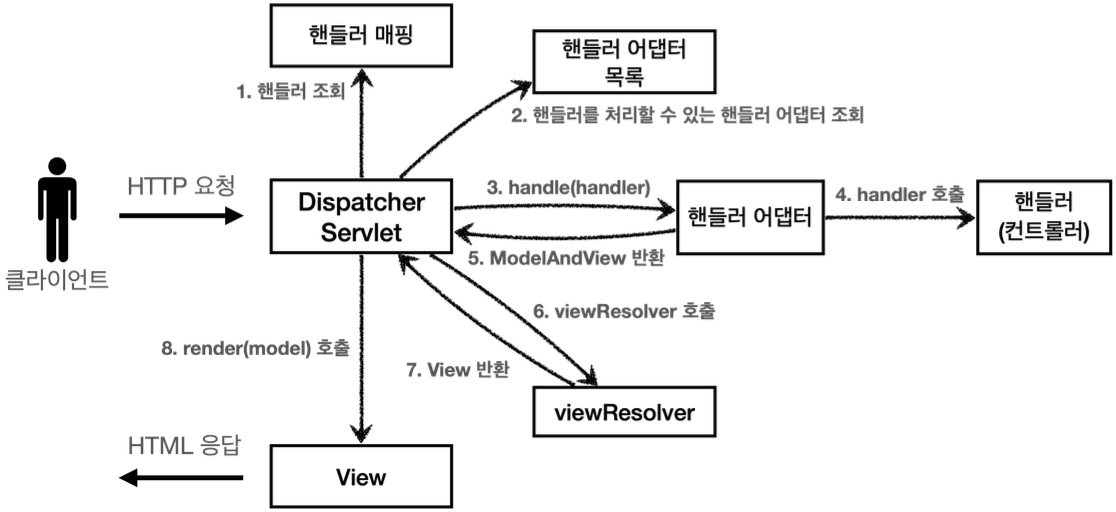
애노테이션 기반의 컨트롤러, @RequestMapping을 처리하는 핸들러 어댑터인 RequestMappingHandlerAdapter (요청 매핑 헨들러 어뎁터)에 있다.
RequestMappingHandlerAdapter 동작 방식
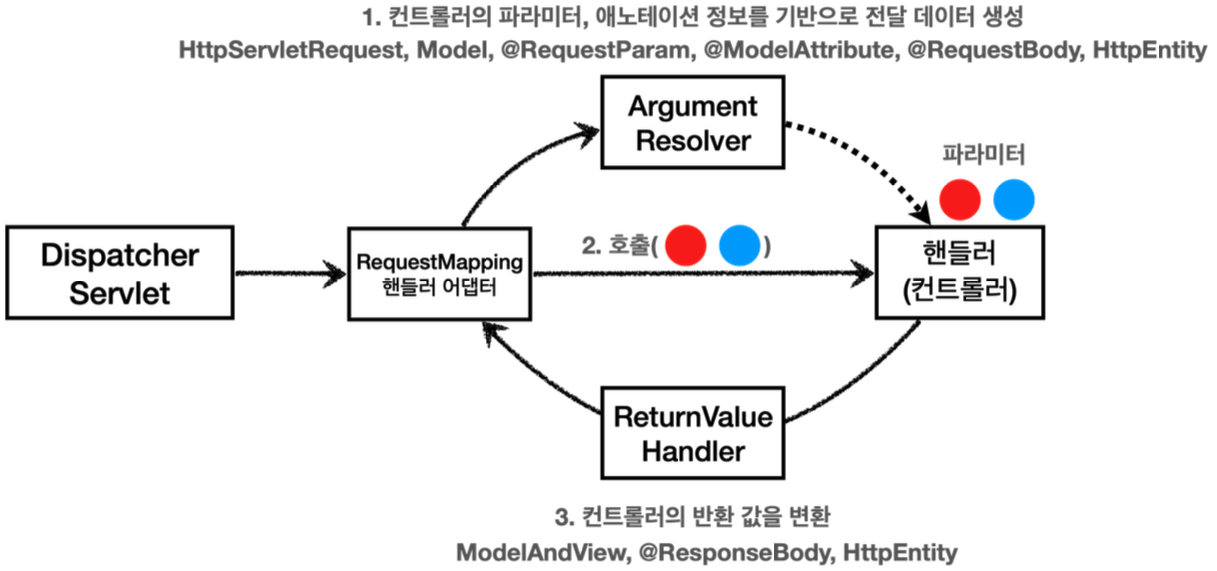
- 클라이언트 요청 → DispatcherServlet 수신
- HandlerMapping: 어떤 컨트롤러를 호출할지 결정
- HandlerAdapter: 해당 컨트롤러를 실행할 수 있는 어댑터 선택
- HandlerAdapter 내부에서 ArgumentResolver 사용
→ 메서드 인자들 분석 후 필요한 객체 생성 → 핸들러(컨트롤러)메서드에 인자로 전달 - 컨트롤러 실행
- ReturnValueHandler 실행
→ 반환 값 적절한 방식으로 뷰 이름을 찾거나, JSON 변환 등을 처리해서 응답을 생성
애노테이션 기반의 컨트롤러는 매우 다양한 파라미터(HttpServletRequest, Model, @RequestParam, @ModelAttribute, @RequestBody, HttpEntity)를 사용할 수 있었는데 ArgumentResolver 덕분
컨트롤러에서 String으로 뷰 이름을 반환해도, 동작하는 이유가 바로 ReturnValueHandler 덕분 응답 값을 변환하고 처리한다.
ArgumentResolver
스프링은 30개가 넘는 ArgumentResolver 를 기본으로 제공하는데
어떤 종류들이 있는지 살짝 코드로 확인만 해보자.
public interface HandlerMethodArgumentResolver {
    //해당 파라미터를 지원하는지 체크 ㅇ→ resolveArgument() 호출
    boolean supportsParameter(MethodParameter parameter);

    //실제 객체 생성
    @Nullable
    Object resolveArgument(MethodParameter parameter,
        @Nullable ModelAndViewContainer mavContainer,
        NativeWebRequest webRequest,
        @Nullable WebDataBinderFactory binderFactory) throws Exception;
}
HTTP 메시지 컨버터 위치

요청 경우
@RequestBody 처리하는 ArgumentResolver가 있고, HttpEntity를 처리하는 ArgumentResolver 가 있다.
이 ArgumentResolver들이 HTTP 메시지 컨버터를 사용해서 필요한 객체를 생성 하는 것.
응답 경우
@ResponseBody와 HttpEntity를 처리하는 ReturnValueHandler가 있고 여기에서 HTTP 메시지 컨버터를 호출해서 응답 결과를 만듦
'Spring' 카테고리의 다른 글
| [Spring] 스프링 MVC - 구조 이해 (0) | 2025.03.11 |
|---|---|
| [Spring] MVC 프레임워크 만들기 (0) | 2025.03.09 |
| [Spring] 서블릿, JSP, MVC 패턴 (0) | 2025.03.07 |
| [Spring] 서블릿 (2) (0) | 2025.03.06 |
| [Spring] 서블릿 (1) (0) | 2025.03.05 |